
Absolute or Numeric Changing file permissions Mode
Absolute or Numeric Mode
In this mode, file permissions are not represented as characters but a three-digit octal number.
The table below gives numbers for all for permissions types :
| Number | Permission Type | Symbol |
|---|---|---|
| 0 | No Permission | - - - |
| 1 | Execute | - - x |
| 2 | Write | - w - |
| 3 | Execute + Write | - w x |
| 4 | Read | r - - |
| 5 | Read + Execute | r - x |
| 6 | Read + Write | r w - |
| 7 | Read + Write + Execute | r w r |
Using of chmod command :

In the above-given terminal window, we have changed the permissions of the file 'sample to '764'.
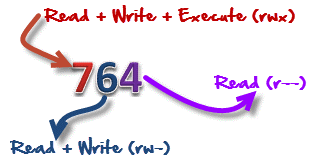
Numeric file permission Mode
'764' absolute code says the following :
• Owner can read, write and execute
• Usergroup can read and write
• World can only read
This is shown as '-rw xrw -r-'